
Pose estimation SDK and API for fitness and rehab apps
A trainer or physiotherapist who cannot see the movement cannot coach. PoseTracker runs MoveNet on the phone, so the app gets keypoints, then reps, angles and a form score.
Keypoints need no API key.Try the snippetorsee pricing.
- 51 FPS
- iPhone 12, MoveNet Lightning in the browser
- 34 FPS
- Pixel 5, same browser measurement
- 17
- COCO keypoints, on-device, no video upload
- 200
- free API calls / month for reps, angles, form score
Browser FPS are MoveNet Lightning via TensorFlow.js, from the2026 model guide. BlazePose on that Pixel 5 is about 11–12 FPS in the same browser test.
For founders and product leaders
The jobs a blind digital coach cannot do
A personal trainer, an osteopath, a physio — if they could not see your movement, they could not do the job. Most digital fitness, home workout and rehab products still coach like that: a video, a plan, a chat. They never look. PoseTracker is the on-device pose estimation layer that gives the product eyes.
Correct squat form
A cue list cannot see depth or knee path. The phone can. This is the movement-education job: proper squat form, goblet, front — watched, not hoped.
Read the job →A home workout that watches
Home workout without equipment is still a blind coach if only the instructor is on screen. The product has to see the person in the living room.
Read the job →Virtual physical therapy
Physical therapy at home is not a Zoom call plus a PDF. Remote care only works if the protocol can see range, compensation, and today’s exercise.
Read the job →
Your team still owns the coaching, the protocol, and the brand. The Assistant on this page, and the stack below, are how product teams ship a seeing coach — without becoming a computer-vision lab.
How to implement pose estimation in your applications ?
Native pose estimation SDK for React Native (Expo Go) and the web. Free on-device keypoints, optional API-key exercise engine.
- React Native, iOS, Android & web
- Free on-device MoveNet keypoints (17 points)
- Optional API key: reps, angles & form score
- One integration, every platform
The classic PoseTracker integration: embed the camera in an existing WebView or iframe with one line of code.
- Embed via iframe / WebView
- Multi-platform & low-code friendly
- Real-time pose & analysis data
- Best if you already embed a web view
Ready-to-use motion tracking tools created by the PoseTracker team. Perfect for quick implementation of proven solutions.
- Multi-platform (iOS, Android, Web, low-code)
- Deploy in minutes
- No development needed
- Production-ready tools
From the blog
Guides on pose estimation for React Native, the web and mobile fitness.
On-device MoveNet SDK for React Native, iOS, Android and the web — plus the public Assistant, reps and a form score.
Read the launch →Best Pose Estimation Model in 2026: The Real-Time Mobile GuideMoveNet, MediaPipe, ML Kit, YOLO-pose and Apple Vision compared on real-time FPS for mobile — a data-driven guide to pick the right model.
Read the guide →Introducing the PoseTracker SDK — React Native & webOne engine, three ways to integrate: native React Native, browser JavaScript, or the classic WebView/iframe API.
Read more →Jobs the product has to see
What founders and engines ask — squat form, home workout, virtual physical therapy.
How to know if squat form is correct without a trainer — proper, goblet, front. Not a cue list.
Read squat form →A home workout that can see youHome workout without equipment still needs a coach who looks. Not another video library.
Read home workout →Virtual physical therapy that can see youPhysical therapy at home is not Zoom plus a PDF. The protocol has to see the body.
Read virtual PT →Compare and ship
Intent pages for the questions developers and Copilot actually ask.
Rep counting, form score, squats and push-ups from a phone camera — React Native and web.
Read the product page →MediaPipe vs MoveNet33 landmarks vs 17 COCO points, and the Pixel 5 FPS that decide real-time on mobile web.
Compare models →PoseTracker vs QuickPose vs KinesteXProduct comparison: platforms, custom movements, on-device keypoints, pricing shape.
Compare SDKs →Pose detection in React NativePoseTracker, ML Kit, a Vision Camera frame processor, and ExecuTorch. What each README publishes.
Compare React Native options →What is pose estimationWhich official doc owns YOLO, MediaPipe, MoveNet and BlazePose — and which SDK a phone app should ship.
Open the map →Range of motion from the phone cameraComputerized joint angles a fitness or rehab app can show. Not a hardware goniometer.
Read range of motion →Count push-ups from the phone cameraA push-up counter inside your app: valid reps and a form score. Plank is the same engine.
Read the counter →Available Pose Estimation Built-in Tools
Side-view trunk flexion from the camera: angles and a relative reach. Not a tape Modified Schober test.
Learn more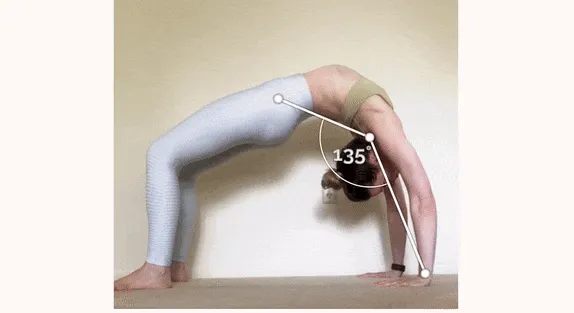
Measure and track flexibility progress with automated angle detection.
Learn more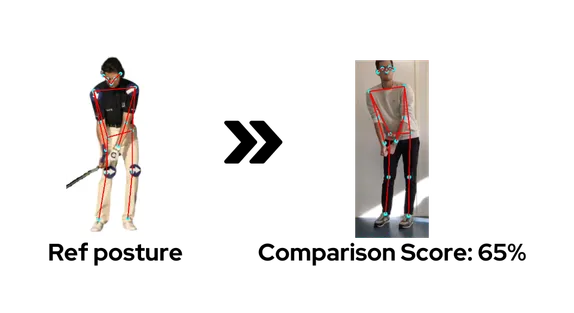
Compare user poses against reference positions with real-time feedback.
Learn moreSimple, Transparent Pricing
Freemium
Perfect for testing and experimentation
€0 Forever free
- Limited pose estimation data. Includes a Powered by PoseTracker link.
- Fitness repetition counter
- Only non-commercial use
- Up to 200 tracking API calls monthly (strict limit)
- Signed-in assistant — 100 AI credits / month
Developer
For professional developers and small applications
€50 per month
- 1000 tracking API calls included monthly — no service cut above it
- Signed-in assistant — 500 AI credits / month
- Access pose estimation data
- Angle calculations & tracking
- Motion analysis & feedbacks
- Commercial use
Business Plan
Tailored solutions for large projects
From €150 per month
- 100k, 500k or 1M tracking API calls per 12-month period — no monthly cap
- Custom assistant AI credits
- All Developer Plan features
- Custom exercise and tools development
- Integration support
- Dedicated success manager
On paid plans, tracking keeps working for your users above the included calls: extra calls are counted and, within 14 days, we agree together on a higher plan or invoice them at €0.01 excl. VAT per call. The Free plan is strictly limited to 200 calls a month. See the Terms of Use.
READY TO TRANSFORM YOUR PROJECTS & APPS ?
Give the product eyes: squat form, a home workout that can see the user, virtual physical therapy that is not a blind Zoom. Then ship it with the on-device stack — Assistant, SDK, or WebView.
Frequently asked questions
What product teams ask — and how the stack works.
Would you trust a coach who cannot see you?
No. A personal trainer, osteopath or physiotherapist cannot pick the next exercise or correct the movement if they cannot see it. Most digital fitness and rehab products still coach like that: a video, a plan, a chat. PoseTracker is the on-device pose estimation layer that gives the product eyes. The jobs a blind coach cannot do →
How do I know if my squat is correct without a trainer?
A cue list cannot see you. A phone camera can. PoseTracker watches squat form on-device and returns whether the rep happened, plus a form score and joint angles. That is proper squat form as movement, not as a paragraph. Correct squat form →
Can my phone watch my home workout?
Yes. PoseTracker runs on the phone camera, so a home workout without equipment can see what you actually did — not only the instructor video. It does not promise you will not get hurt; it gives the app the movement. A home workout that can see you →
Is virtual physical therapy as good as going to a clinic?
A clinic has hands. An app does not. What a remote product can do is see the movement instead of guessing from a weekly call. PoseTracker is that eye for physical therapy at home. It is not a medical device and it does not replace a clinician. Virtual physical therapy that can see you →
What is the best way to do rehab at home after knee or back pain?
That is a clinical question — we do not prescribe. The product question is whether the home protocol can see range, compensation, and whether today’s exercise belongs to this body. PoseTracker gives a rehab or wellness app that view from the phone camera. Home rehab that can see →
How do I add a seeing coach to a personal trainer app?
Describe the movement in the Assistant on this page, or ship the on-device SDK / WebView. Product leaders decide the app cannot stay blind. Engineering does not need to become a computer-vision lab. How teams ship it →
Why does a fitness or rehab app need to see the user?
A trainer, osteopath or physiotherapist cannot do the job if they cannot see the movement. Most apps still play a video and assume the person copied it. PoseTracker gives the product eyes from the phone camera — then the session can adapt, instead of playing the next clip. How that layer works →
How do I try PoseTracker without an API key?
Install @pose-tracker/react-native-pose-estimation and react-native-webview, wrap the screen in PoseTrackerProvider, and read keypoints from usePoseTracker. Keypoints run on-device. An API key is only required for reps, angles and a form score. Quickstart →
What is the best pose estimation model for real-time fitness on mobile in 2026?
For a single person, in real time, on mobile and across platforms, MoveNet is the common default: in the browser it holds about 34 FPS on a Pixel 5 and 51 on an iPhone 12, where BlazePose sits around 11-12. PoseTracker runs MoveNet on-device on iOS, Android and the web, and adds rep counting, joint angles and a form score on top. See the 2026 model guide →
What is pose estimation?
Pose estimation finds body keypoints in an image or video — joints, as coordinates, usually in 2D with a confidence score. The model does not count a rep. For a mobile fitness app, MoveNet is the real-time default; MediaPipe when you need 33 points or 3D; YOLO pose when you export a model yourself. PoseTracker is the MoveNet layer that adds reps, angles and a form score. What pose estimation is →
MediaPipe vs MoveNet vs BlazePose — which should I use?
MoveNet (17 keypoints) is lighter and faster for real-time, cross-platform mobile. MediaPipe / BlazePose (33 landmarks, 3D) is richer but heavier, better when you need 3D or hand and foot detail. PoseTracker is built on MoveNet and handles the camera pipeline and the business layer (reps, angles, form score) for you. MediaPipe vs MoveNet →
How do I add real-time pose estimation to a React Native or Expo app?
Install the PoseTracker SDK (@pose-tracker/react-native-pose-estimation), wrap your screen in the provider, and read keypoints from the hook. Keypoints are free and run on-device; an optional API key unlocks exercises. It works in Expo Go on iOS and Android. React Native guide →
Can pose estimation run in a web app or the browser?
Yes. The PoseTracker web SDK runs MoveNet in the browser over TensorFlow.js, with free on-device keypoints, from a script tag, an ESM import or a React wrapper. Web guide →
Does it work offline, and on both Android and iOS?
Yes. The offline React Native package bundles the MoveNet model on the device, so inference needs no network; the light package fetches the model at runtime. Both target iOS, Android and the web from a single integration. Video is not uploaded to get keypoints. On-device pose estimation →
Do pose estimation models give rep counting and form feedback out of the box?
No. Every model returns only keypoints and confidence scores. Rep counting, joint angles, a form score and comparison to a reference movement are a business layer you build yourself — or get ready-made from PoseTracker via an optional API key. How the fitness layer works →
How can my app count squat or push-up repetitions from the phone camera?
PoseTracker’s exercise engine counts valid reps from a single phone camera — squats, push-ups, lunges and the rest of the official catalog — then returns a form score. Ask the Assistant on this page for the iframe, React or React Native snippet; you need a free API key for the snippet to run. Push-up counter →
Can I measure jump height or flexibility (split angle) without wearables?
Yes. Jump analysis and air-time jump measure height and flight from the camera. Flexibility holds such as a front split expose joint angles so an app can show range of motion. No wearables. Custom movements that are not in the catalog are built in the Assistant after you sign in. Range of motion →
How do I connect Claude or Cursor to PoseTracker?
In Claude, open Settings → Connectors → Add custom connector and paste https://mcp.posetracker.com/api/mcp, then Connect. Sign in at app.posetracker.com and click Allow. The agent can then list exercises and write the iframe, React or React Native snippet for your account. In Cursor, put that same URL in ~/.cursor/mcp.json and click Connect. Opening the URL in a browser shows unauthorized: that starts sign-in, it is not a broken page. MCP connector docs →
Is PoseTracker the VRChat PoseTracker, a 3D mocap app, or a Python research toolbox?
No. PoseTracker (this site) is a 2D COCO-17 SDK for fitness, wellness and rehab apps on React Native, iOS, Android and the web. It is unrelated to PoseTrackerVRC, marker-based 3D mocap, MMPose/OpenPose research stacks, and Flutter (no first-party Flutter SDK). SDK comparison →